The Search for UAPs - How to Play (Official)
Games in This Video
1 game is featured in this video — it unlocks as you watch.
Transcript
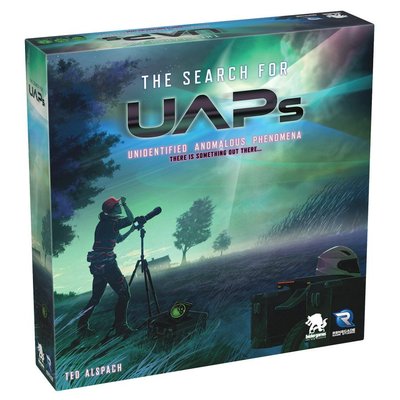
grab yourself a coffee and pull up a seat because today I'm teaching you how to play the search for uaps from Renegade game studios oh and bizer games can't forget those guys let's continue I'm Mark Maya and this is board game coffee get back here this instant thank you oh I love you too thanks I couldn't have done it without you thank you thank you over the last century people have reported seeing strange things in the sky unidentified flying objects if you will while many of these sightings were once credited to the mid 20th century sci-fi craze recent reports from respected military personnel backed by video evidence suggests there's something up there we can't quite explain in the search for uaps you step into the role of an astronomy Enthusiast who spotted something unusual amongst the stars with the help of your telescope camera and research you'll track down these unidentified anomalous phenomenons to help scientists better understand what they are and to do that you'll need to keep your eyes on the skies the answers could be closer than you think today I'll be teaching you how to play the one to five player competitive game the search for uaps in the search for uaps you'll need your wits along with
this Nifty companion app to gather Clues and identify mysterious objects orbiting the Earth throughout the game you'll attempt to gather as much information as you can by snapping photo evidence of these objects to earn points although the ultimate goal is to pinpoint the ever elusive UAP the player who contributes the most to these goals wins the game points if you have the most points at the end you win just in case that wasn't clear let's move on in this video I'll be teaching you how to play a three-player game using the basic rule set if you're looking to play with the expert rules you'll find the necessary rule adjustments clearly labeled throughout the rule book it should be noted if you're playing with five players then you have to play with the expert rule set to play a solo game there's a few rule adjustments you'll need to make that we won't be covering in this video but you can find them in the back of the rule book before we get to the setup you should know that to play the search for uaps you'll need to download the free companion app to your mobile device or tablet playing without the app is not an option if you don't have enough devices for everyone at the table that's okay multiple players can use a single device and just pass it around as needed
although for the best experience I would definitely recommend everyone having their own phone or tablet and you're going to want to make sure you're all charged up before you start oh and being that the game uses wet erase markers you might want to keep some damp paper towels on hand or something to wipe off any little mistakes you might make now if you're anything like me then this would be more than enough heck I've been using this same square for the last six games but if you're more of a let's say Britney type of person then you might want to take a trip to Costco hey the game board is made up of two double-sided pieces a basic side and an expert side for this video we'll be using the basic side which looks like this although as mentioned earlier if you're playing with five players then you'll need to use the expert side of the board this smaller middle piece represents the Earth place it in the center of the bigger board and rotate it so that the one and nine sectors are aligned both of these pieces are magnetized so they stay in place nicely next each player takes two researcher tokens in a color of their choice and places one of them on the first space of the time trck researcher tokens placed in this way should be stood up in a line the order of the line should be decided
randomly since it will be used to determine the order of play the second researcher won't be placed until the app tells you to so just hold on to them for now each player should now take a screen in their matching color and set it up in front of them like this the player screen is not only filled with useful reference information that you'll need while you play but it also hides all the information you'll gather from other players next each player should collect the following a wet erase marker a noteboard a satellite /scoreboard and a set of spaceboards just like the main game board your space board is also made up of two double-sided pieces a basic side and an expert side the side you use should match the game board so since we're playing on the basic side of the game board we'll be using the basic side of our spaceboards attach the magnetized Pieces Just as you did with the game board making sure that the number nine sector and the number one sector are lined up it's important that your space board is aligned with the main game board so if I was sitting here I I would align my space board like this but if I was sitting here I would align my space board like this so that it matches exactly the position of the main game board lastly gather 26 photo tokens in
your matching color you'll notice that some of the photos have a solid cornog graphic like this and others have a hollow cornog graphic like this these eight photos with the Hollow Corners are only used in the expert game so since we're only playing with the basic rules we can place these eight photos back in the Box the remaining photos should be placed behind your player screen now it's time to set up the app as mentioned earlier to play the search for uaps you're going to need the companion app each player can use their own device or share a device with one or more players the first thing you're going to need to do is download and install the app app to your device now if you have an Apple device like I do then you'll download the search for uaps from the App Store if you're an Android User then you can just grab it from the Google Play Store once you have the app installed and running select one player and one player only to tap the start basic game option on their device at that point the player will be presented with a code like this one each player then records this code on on their own scoreboard now all other players everyone except for the one that generated the code should tap this enter game code option this will take you to the screen where you enter the code that you just wrote down on your scoreboard
and then tap join game at this point verify that all devices are displaying the same game code then press continue next you'll be taken to a screen that will display which quadrant modifiers you'll be using and where they're placed simply place the depicted quadrant modifiers on the physical board so that they match the same modifiers displayed in the app if you wish to swap out one of these modifiers you can do so by tapping the quadrant you want to change then selecting the modifier you would like to replace with one from the options provided now this part is very important if you do decide to swap out one of the modifiers then make sure that everyone swaps out the modifier on their own device before they continue past this screen if you're new to the game I would recommend just using the options that the app originally suggested and wait till you're a little more familiar with the game and how it plays before you start swapping out modifiers next place the Luna token toen in the sector indicated on the app then all players track the position of the Luna token by circling the Luna icon on their personal spaceboards next select your player color and hit
continue Now using one finger rotate the game board on the app so it matches the same way the board looks from where you're sitting much like you did with the space boards then tap the lock icon in the upper right Corner this will lock down the position of the board on your screen so you don't accidentally rotate it while playing now one thing you should know about sectors is that they can only ever contain one object so since we know that this sector contains the moon we can safely cross out all the other objects in that sector once you're done that follow the instructions on screen and cross off all the objects in the indicated sectors after you're done Crossing off all the objects you instructed to your space board should look something like this your space board won't look like mine since the app generates different locations for each object per game so make sure you're Crossing off the objects shown on your device not this video the next thing you'll need to do is select your difficulty level the difficulty level you select will determine how many additional facts you will receive for this how to play we're going to set our difficulty level to beginner which means we'll be receiving eight pieces of information which we'll see on the following screen in this example the app is telling us to cross off these
eight objects which can be found in the indicated sectors it's important to note that at this point the information you receive after you select your difficulty is private information and each player regardless of the difficulty level they choose will receive different information it's also important to note that players do not have to play at the same difficulty level if you're sharing a device then you'll have to wait your turn before you get an option to choose I'll show you an example of that shortly once you've selected your difficulty level you'll be asked to place your researcher on one of these four quadrants after you've placed placed your researcher tap that quadrant in the app to lock in your decision then tap continue it's important that the information on the board is the same as the information in your app once everyone has gone through the steps we just covered tap start game to start playing now keep in mind if someone is sharing a device this is the point where you would tap add player then follow the steps prompted by the app select your your colors update your space board with the provided information select your difficulty level update your space board again and select the quadrant to place your researcher keep in mind there is no limit to how many researchers can be placed on a single quadrant once you're
done adding players to a shared device press start game at this point you'll be presented with a list of actions that you can take on your turn but since we haven't learned how to play yet you probably have no idea what any of this means so let's learn how to play the search for uaps is a game about looking for specific objects in space using logic and your skills of deductive reasoning now that all sounds great but what does it actually mean you see the game presents you with a set of rules that act like hints that lead you to specific objects let me give you an example let's say that the universal rule for my wife's dirty socks is that they're always on the floor that's the rule this means if I'm looking for my wife's dirty socks I wouldn't look in the hamper and I wouldn't look out in the yard I would only look for the dirty socks on the floor because that's the rule my wife's dirty socks are always on the floor now to be clear the search for uaps has nothing to do with looking for dirty socks the things we're looking for will be more space oriented Like Satellites and meteor showers that sort of thing and to help you find these objects each player is given one of
these spaceboards if you look closely you'll notice that each sector has a collection of icons each of these icons represents an object that could be found in that sector but here's the thing in each sector there can only be one object so if I discover a spy satellite in the sector I can be certain that no other objects are present in that sector as you play the game you'll use the information you collect to eliminate objects that can't be in a certain sector and circle the ones that you know for sure are in that sector all the information you've gathered is private nobody else gets to see your space board or any of your other notes so make sure to keep them hidden behind your player screen all right now that we got an idea of what the game's about let's familiarize ourselves with the game board the primary game board is made up of two orbits the inner orbit and the outer orbit as the game progresses the inner orbit will rotate counterclockwise but the outer orbit will always remain stationary the board is broken up into four quadrants as indicated by these thick white lines each quadrant on the basic side of the board contains four sectors keep in mind that as the Earth rotates the quadrants will rotate with
it which means the sectors located within the quadrants will change when a game refers to a sector that is next to something it's specifically talking about sectors that are side by side like this sectors that are above and below one another are referred to as stacked and lastly when the game refers to a sector that is directly across from something it's referring to the sector that is located directly across the board and in the same orbit so this sector is directly across from this sector and this sector is directly across from this sector during the setup we place these quadrant modifiers on the main board quadrant modifiers introduce a set of rules that only apply to the quadrant where they're located and only affect the players currently in that quadrant the effects of these modifiers will vary from positive effects like Charter flight which allows you to move to and from a particular quadrant for free free to negative modifiers like overcast that prevents you from taking photos in a quadrant there are too many modifiers to cover in this video but what each of them does is written right on them and for the most part they're pretty self-explanatory but if there's anything you don't understand or you're just looking for more information there's a quadrant modifier reference section
towards the back of the rule book during the game you'll be searching for nine different types of objects orbiting the Earth Luna the moon the Hubble Space Telescope the International Space Station meteor showers a number of spy satellites communication satellites navigation satellites space junk as well as the UAP as discussed earlier with my dirty sock example each object in the game has specific rules Gover in which sectors it can occupy in relation to other objects and the orbits themselves but remember the number one rule each sector can only ever contain one object with that said let's start with the easiest object to find in Space the moon AKA Luna there will only ever be one Luna object and it's always located in the outer orbit and is revealed to all players at the start of the game told you it was easy to find the rules for the Hubble Space Telescope is that it's always located in the outer orbit but it can never be located next to Luna this means it could be in any of these sectors but it could never be here or here because both these sectors are located next to Luna and there's only ever one Hubble Space
Telescope there's also only one International Space Station and the rule is that it can only ever be located in the inner orbit and it must be next to at least one junk in this example it could be located between these two pieces of junk but not in these two sectors because there's no space junk next to those sectors when it comes to spy satellites there can be anywhere from 1 to two hidden on the basic side of the board the rule for spy satellites is that they only appear in odd numbered sectors and can only be found in the inner orbit there will only ever be one or two communication satellites to be found on the basic side of the board the rule for communication satellites is that they always appear in even numbered sectors and they can appear in either orbit nav navigation satellites always appear in pairs on opposite sides of the board so if I know there's a navigation satellite here in the inner orbit then the other will be across the board in the same orbit the same rule applies if you find it in the outer orbit since navigation satellites come in pairs there will be either two four or six navigation satellites hidden somewhere on the basic side of the board
meteor showers are also found in pairs so there will either be zero 2 four or six meteor showers to be found on the basic side of the board meteor shower pairs always come stacked that means if there's one up here then there will be one down here and vice versa now it's important to note that this positioning rule only applies to the state of the board at at the start of the game so as the inner orbit rotates you'll have to track the position of meteor showers let's go over a quick example let's say that since the start of the game the Earth has rotated a total of two sectors this means if we find a meteor shower here then we know that there was another meteor shower located below this space at the start of the game but since the board has rotated two sectors since then that would mean that the meteor shower we're looking for moved two spaces over because when the game started this sector used to be here space junk can also be found in either orbit but there can never be more than two space junk next to each other in this scenario we can be sure that there's no space junk in any of these sectors because having space junk here would violate the rule that no more than two space junks can be next to each
other the amount of space junk you'll find will be somewhere between one to five the UAP can be found in either orbit but there's only one of them but what makes it unique is that it will always appear as space junk this means that if these were all the sectors that contained space junk one of them would actually be the U AP I know it might seem like there's a lot of rules to remember but don't worry every rule for the objects we've discussed is listed on the back of your player screen for easy reference in the search for uaps the order of play isn't determined by moving clockwise around the table as it is in many other games instead it's based on the position of each player's token on the top Time Track the player whose token is furthest back on the time trck becomes the active player as the active player you'll choose one of six actions to perform and the action you select determines how far you advance on the time track for example if I choose an action with a Time cost of one I would perform the action then move my researcher token one space forward on the time track after after that the blue player being the furthest back on the
track becomes the active player if the blue player also performs an action with a Time cost of one they move their token forward by one space if they land on a space already occupied by another researcher the blue player token is placed in front of the researcher that was already there next the orange player becomes active but they chose an action with a Time cost of five this action moves their token five spaces ahead placing them much further along the time trck than any other player but if the orange player all the way up here and the other players continue to take actions costing only one or two time then it's going to be a while before the orange player gets to the back of the line which means they're going to have a bit of a wait before they're the active player again and if you're wondering yes it it is possible for one player to take multiple turns back to back if after taking an action and paying its time cost a player still finds themselves at the back of the line because everyone else is way up ahead they get to perform another action and they'll keep performing actions and paying time costs until they are no longer in the back of the line okay so you're the last person in line you know what that means that's right it's your turn on your turn you'll
select one of six available actions move survey Target take a photo analyze satellite data or find the UAP each action has a Associated time cost which dictates how many spaces you move your researcher along the time trck to perform an action you'll tap the corresponding option in the app if an action is grayed out like the analyze satellite data in this example it means that action is currently unavailable the number displayed next to each action is the time cost for that action once you select an action the app will guide you through the necessary steps and choices since the app pretty much walks you through the process of what happens on your device I'll be mostly focusing on what happens on the table all right let's go over each of those actions starting with the move action many actions in the game are restricted to the quadrant where your researcher is currently located to move your researcher to an adjacent quadrant you'll need to use the move action which has a Time cost of one if you want to move two quadrants away the time cost increases to two while you'll need to manually update the physical board by moving your research token from one quadrant to the next and advancing along the time track accordingly in the app
once you've selected the quadrant you've moved your researcher to it will automatically update your researcher's movement along the time trck survey allows you to search the sectors in your quadrant for a particular type of object to do that I would first activate the survey action in the app select the area I want to search select the object I'm searching for then tap continue the app will return a result of how many times that object appears in the sectors I selected but it will never tell me which sector the object is in specifically you'll have to deduce that on your own whenever you receive information about a sector update your space board and jot it down in your notes we'll be going over note taking a little later in the video When selecting your survey area you have several options each with a different time cost associated with it the more specific the area the higher the cost by selecting quadrant you survey all four sectors within your current quadrant for a Time cost of one orbit will survey any two sectors in your quadrant that are next to each other this will have a Time cost of two stack is referring to two sectors in your quadrant that are above and below each other this also has a Time cost of
two and lastly you can choose to survey just a single sector for a Time cost of three when you survey an area you need to announce to the table which sectors you're surveying and what type of object you're looking for however keep the result results of your survey confidential that information is For Your Eyes Only and keep in mind you can still survey multiple sectors even if some of those sectors already have revealed objects Target is great it's expensive but oh so useful for a Time cost of four the target action allows you to select any one sector in your quadrant and the app will reveal which object is in that sector then all you got to do is track that information on your space board doesn't get much easier than that the take a photo action lets you guess the object in the sector within your quadrant this action has a Time cost of one and you can only take one photo at a time once you're confident about an object's location you can take a photo to potentially earn points at the end of the game to take a photo browse the photos you received at the beginning of the game select the photo of the object you believe you found and place it face down in the sector where you think that object is located there
is no limit to how many face down photos can be placed in a single sector but once placed it cannot be moved remember to enter this information into the app and make sure the other players don't see the object you selected photos placed in this way will be verified each time the Earth rotates which we'll cover a little later in the video and the last thing you need to know about taking a photo is you cannot take a photo of a sector that already has a revealed photo in it in order to perform the analyze satellite data action you'll need a satellite so until a satellite has been revealed by any player this action cannot be performed but as soon as a satellite is revealed you can analyze its data there are three different types of satellites that can be found communication navigation and spy and each of these satellites will provide different information for the sake of this example let's say that the location of at least one of each satellite type has been revealed now remember you don't have to be the one who revealed the satellite as long as it's revealed on the board you can analyze it and unlike most other actions you don't have to be in the same quadrant as the satellite that you're analyzing you can Target a satellite from anywhere on the board when you
select a revealed satellite in the app to analyze you'll be presented with two distinct pieces of information by selecting one of the options from a specific satellite you'll be taken to a screen where you'll be given private information on the location of an object maybe you'll be told that the International Space Station is in an odd-numbered sector or that the Hubble Space Telescope is not next to a communication satellite regardless of the information once you've received it jot it down in your notes the app will then prompt you to advance your researcher token a number of spaces on the time trck based on the satellite that you analyzed if you analyzed a communication satellite or a navigation satellite that will have a Time cost of one but if you analyzed a spy satellite that has a Time cost of two when you're analyzing satellite data announce to the table which satellites you're analyzing and that's it don't give them any more information and keep in mind when you analyze a satellite there's no reason to analyze it again for the same option because the information you're going to get back will be the same however you may want to analyze it for the other option that you didn't select the first time around the Last Action we're going to cover is find the UAP this is the big one and it has a whopping time cost of
five remember the UAP will always appear as junk so you might have already seen it without even realizing it finding the UAP isn't just about guessing which sector it's in you'll also o need to identify what objects are located in the three neighboring sectors for example if I suspect that the UAP is in this sector here then I would also need to know what objects are in this sector this sector and this sector if I guess even one of those objects wrong I fail the search for the UAP so make sure you have your facts straight before you attempt this one within the app tap the find the UAP button then select which sector you think the UAP is in and hit continue the app will then ask you what object is located in each of the three neighboring
sectors once you've confirmed all your guesses you'll be told whether you found the UAP or not when looking for the UAP Do not announce where you're looking just let people know that you are looking and then let them know if you succeeded or failed because the first player to find the UAP triggers the end of the game which we'll go over a little bit later once the last researcher token crosses this thick line on the time trck the Earth will rotate counterclockwise by one sector the arrow here will act as a reminder this rotation occurs each time all of of the researchers cross one of these marked sections on the track when the Earth does rotate make sure to update the position of your space boards to reflect the new position shown on the main board in the app you can easily rotate the Earth by tapping this rotate icon each time the Earth rotates all face down photos on the game board are flipped face up and verified to see if they're correct correct to verify the photos on the board tap the verify photos button on the app then turn up all the face down photos when you flip over a face down photo make sure it's oriented like this to distinguish it from any other photo
that might have already been verified if players other than you have taken photos you'll have to add those to your device manually as you can see here all the photos that I place on the board are indicated in my app but not the ones placed by other players to add those photos simply tap the add photo button select the sector you want to add the photo to then select the type of photo once you've added all the photos you need to tap continue to proceed to a list of all the photos awaiting verification if you spot any errors you can tap the X next to the photo to remove it from the list after confirming that the list is accurate tap verify photos to proceed to the verification screen here you'll see which photos were correctly identified and which were not photos that are incorrect should be removed from the board and placed back in the Box they do not return to their original owners and the player who took the incorrect photo moves one space ahead on the time track for each incorrect photo they took verified photos on the other hand will remain on the board and and should be rotated to indicate that they have been checked these verified photos will earn you points at the end of the game is assuming they're your photos at some point during the game you'll notice this green UAP icon pulsing on your screen this means that
new information about the UAP has just been Declassified by the government by tapping this icon you'll be taken to a Declassified U U AP report which will give you useful information to help you deduce the location of the UAP this information should be recorded at the bottom of your noteboard although if at any point you miss any information or just want to double check that you've written it down correctly you can always tap the green UAP icon again to review all the information you've received so far now this part is very important so listen up even though all players will receive the same UAP information when they receive the information is not the same so when you receive this information keep it to yourself do not share it with other players they are not your friends okay I'm going to be honest I'm terrible at taking notes not just for this game I mean in in general but the designers for search fore uaps have made no ticking easy ER this is your noteboard and your noteboard is used for taking notes the noteboard is broken up into three columns in this column you'll record the action you took in this one you'll record the results and in this one you
can jot down any extra information that you might find useful to help you out once you've finished entering your action into the app you'll see this little window that looks like a tiny segment of your noteboard in that window you'll see a note for the action you just performed so I can just copy what I see in this window to my noteboard brilliant this bottom section here is used to record the Declassified UAP information that you receive throughout the game over here on the back of your scoreboard is where you'll record the information you've gathered by analyzing satellites you'll notice that each satellite has two lines one for each bit of information that the satellite has to offer the end of the game is triggered when one player correctly identifies the location of the UAP but even though they've ended the game that player still needs to advance their researcher token five spaces on the time trck now remember and this is very important when you find the UAP Do not announce the location to other players this might be the end of the game but it's not over yet once the end of the game has been triggered no more turns are taken however each player whose researcher is at least one space back on the time trck from the player
who found the UAP will get one final opportunity to score points those players will have the option to either take photos or try their hand at finding the UAP one of your final scoring opportunities is to take photos this is a great way to earn some last minute points before going into final scoring if you choose to take photos then the number of photos you can take will be based on your position on the time trck if your researcher is one or two spaces behind the researcher who ended the game you may take one photo if you three or four spaces back then you can take up to two photos but if you're five spaces back from the researcher who ended the game you can take up to three photos and the best part is these photos can be taken in any quadrant regardless of the position of your researcher during this final scoring opportunity players do not Advance their researchers on the time track so so place your photo but leave your researcher right where they are the other way to earn some last minute points is to take a shot at finding the UAP the procedures for finding the UAP will be the same as we covered earlier in the video the only difference is how much you score the player who initially found the UAP will earn 10 points at the
end of the game any player who finds it after that will earn points based on how far back they are on the time track from the player who triggered the end of the game so if I was one space back from the player who initially found the UAP I would earn a whopping two points I know not great but it's something if you're two spaces back you'll earn four points three spaces back and you'll earn six points if you're four spaces back you'll earn eight points and if you're five spaces back then you earn 10 whole points not too shabby now you'll only get one shot at this so if you get it wrong now you won't earn any extra points after all the final scoring opportunities have been resolved press the end game and reveal all button within the app the screen will display the objects located in each sector flip over each face down photo on the board and compare it to the results shown in the app all incorrect guesses will be removed and all correct guesses will remain on the board for final scoring once the game has ended each player tallies up their own score and Records it on their personal scoreboard let's walk through an example if I was the player who found the UAP and triggered the end of the
game I would write 10 points in this box here but if I wasn't the first player to find the UAP and instead found it as the result of a final scoring opportunity then my score would be dependent on how far back I am from the player that initially found the UAP just as we discussed earlier there's a chart here that will help you determine how many points you earned if you're one space back you'll earn two points if you're five spaces back you'll earn 10 points over here you'll record how many points you you've earned for each verified photo you took each object is worth a different amount of points so multiply the photos you took of a specific object by the point value listed beside it so in this example I got four points for finding one International Space Station but I got six points for finding two spy satellites because each spy satellite is worth three points after you're finished filling out the boxes add it all up and figure out your total score the player with the highest score wins if there's a tie the player who scored the most points for finding the UAP is the winner if there's still a tie the player who took the most verified photos is the winner and if there's still a tie the tide player who found the UAP first is the winner congratulations you've earned
it and that's it I hope this video helps and I hope you enjoy playing the search for uaps see you next week thanks for joining us if you like this video and you want to see more subscribe to our channel it's the best way to keep up to date with everything we do here at boy game coffee but if you want to see more right now we got plenty of videos to choose from and if that's not enough follow us on Instagram Facebook and Twitter I'm Mark Maya and this is boy game coffee and remember have fun keep gaming be social see you next week